SimplePage Apps

Apps Animoko

AnimokoAnimation app for kids

Make your own cartoon movies

Pose characters, give them faces and your own voice, add a background and music, and turn it all into a movie. No ads, no accounts, works offline.

  • macOS
  • iPhone and iPad
  • Windows
  • Android
  • Ages 9+
  • 11 languages
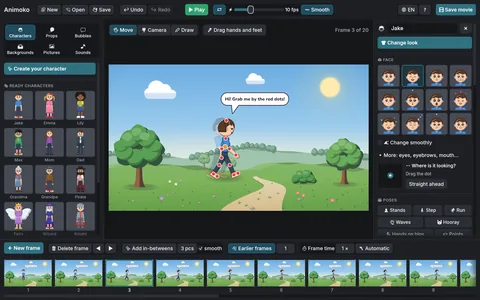
Animoko animation editor: a cartoon character walks through a park with a speech bubble, with the movie’s frames below

An easy movie maker for kids who want to make cartoons

Animoko is an animation studio for young animators aged 9 and up. Pose a character, add a frame, change the pose a little – and step by step a story comes to life. When it's ready, save it as a real movie with sound.

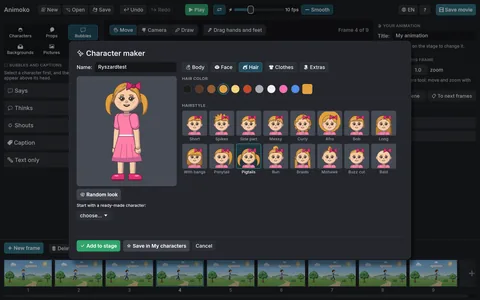
Instead of drawing every figure from scratch, children pick from friendly picture libraries: faces, hairstyles, clothes, poses, backgrounds and props. Every option is shown on their own character, so they can see the result before they choose.

Runs on
macOS, iPhone and iPad, Windows, Android
Made for
ages 9 and up
Languages
11 languages
Requires
macOS 11 or later
iOS 15 or later
Windows 10 or later
Android 10 or later
Price
One-time purchase in the store. No in-app purchases, no subscription.

Features

What’s inside Animoko

01

Characters

  • Two styles: cartoon and stick figure
  • Skin tones, face shapes, eyes, 16 hairstyles, clothes, hats, glasses, capes, wings and more
  • 16 ready-made characters, plus "My characters" to reuse in any project
  • Characters can face front, three-quarter, sideways or away

02

Movement and faces

  • Drag the joints to pose a character, or choose from 14 ready poses
  • 9 ready moves – walk, run, jump, wave, dance and more – create the frames by themselves
  • 12 emotions and 11 face animations: blink, wink, laugh, cry, fall asleep…
  • Record your voice and the character's mouth moves along with it
  • Type a sentence and the character mouths the words, with a speech bubble if you like
  • Smooth motion carries characters and the camera from one key pose to the next

03

Scene and drawing

  • 12 backgrounds (park, city, beach, space, classroom…), a plain color or your own picture
  • 32 props, your own images and speech bubbles
  • Draw freehand on the stage – every drawing can be moved and animated
  • A camera that pans and zooms, and depth that pushes things into the distance

04

Sound

  • 3 tunes and 10 sound effects built in
  • Your own audio files as background music or effects

05

Saving and sharing

  • Export an MP4 video with sound, an animated GIF or a series of PNG images
  • Projects are saved wherever you choose, with autosave and undo to keep work safe

06

Peace of mind for parents

  • Works completely offline – no internet connection needed
  • No accounts, no ads, no in-app purchases and no data collection
  • The microphone is used only when you press the record button
  • A short welcome tour explains each part of the window on the first start
  • Available in 11 languages: English, Polish, German, Spanish, French, Portuguese, Italian, Ukrainian, Dutch, Czech and Swedish

Questions

Making animated movies with Animoko

What is Animoko?

Animoko is an animation app for kids aged 9 and up, on iPhone, iPad, Mac, Windows and Android. Build characters, pose them frame by frame, add a background, music and your own voice, then save your cartoon as a movie with sound.

How do you make an animated movie in Animoko?

Put a character on a background, set a pose, add a new frame and change the pose a little. Ready-made moves such as walk, run, jump and dance create the frames for you, and smooth motion fills in the steps between two key poses. Press Play to watch your cartoon, then save it as an MP4 video, an animated GIF or a series of PNG images.

Is Animoko a stop motion app?

Animoko works the way stop motion animation does — one frame at a time — but without a camera, clay figures or a tripod. Characters, backgrounds and props are in the app, so any frame can be changed later, and onion skin shows the previous frame to keep the movement even.

Do kids need to know how to draw?

No. Instead of a blank page, kids pick faces, hairstyles, clothes, poses, backgrounds and props from picture libraries, and see every choice on their own character right away. If they like drawing, they can also draw by hand on the stage and animate the drawing.

Can the characters talk?

Yes. Record your voice and the character moves its mouth along with it (lip sync), or type a sentence and the character “says” it, with a speech bubble if you like. Animoko also has music, sound effects and room for your own sound files.

Is Animoko good for beginners and for school?

Animoko is made for first animations. A short tour on first launch shows where everything is, autosave and undo protect the work, and projects are saved as files. Making a short cartoon is a good way to practise storytelling in art and language lessons, and Animoko speaks eleven languages.

Which devices does Animoko run on?

Animoko runs on iPhone and iPad via the App Store, Mac (macOS 11+) via the Mac App Store, Windows (10+) via the Microsoft Store and Android (10+) via Google Play. One Apple purchase covers Mac, iPhone and iPad. The app works completely offline.

Is Animoko safe for children?

Animoko has no ads, no accounts, no in-app purchases and collects no data. The microphone is used only when you press the record button, and everything a child makes stays on the device. You buy it once in the store — there is no subscription.

Can I animate with my fingers on a tablet?

Yes. On iPad and Android tablets, tap to select and drag with your finger to move characters and set poses. Press and hold to open menus.

Everything stays on your computer. Animoko is simply a place to create.