An animation app for kids without drawing
Build a hero from pictures, choose poses and ready moves, add expressions and your own voice, then finish a small scene in Animoko.
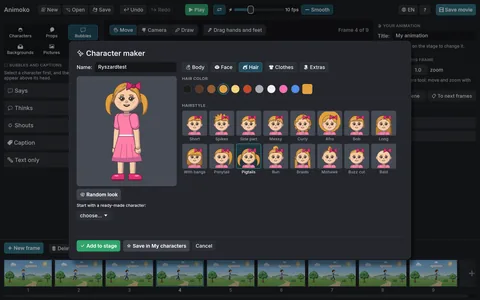
You do not need to draw a person in every frame to tell an animated story. In Animoko, children aged nine and up build characters from picture libraries and move their joints. This guide takes a hero from the first choice of hairstyle to a small finished scene. Set aside about half an hour and begin with one character, one background and one action.
The app suits children who have a story in mind but hesitate over a blank page. It also gives families and teachers a shared starting point: the child can make the creative decisions while an adult helps locate controls. Animoko runs on iPhone, iPad, Mac, Windows and Android; see the Animoko page for platform information.
Build a hero from pictures
Open Characters and then ✨ Character maker. Choose the face, hair and clothes by looking at the options on the character. Try a few combinations, then settle on a hero whose outline is easy to recognise. A distinctive hairstyle or hat can do more for a short story than lots of small details.
You can also begin with 🎭 Ready characters. For this exercise, ask your child who the hero is waiting for and how they feel. Those two answers will guide the acting. There is no need to create a whole cast before animating.
Turn a pose into movement
Select the hero and use ✋ Move to drag an arm or bend a knee. The 14 ready poses offer starting points when a stance is difficult to arrange. Make the first pose readable before adding movement: could someone guess the action from that single picture?
For a quick result, use 🎬 Ready moves. Its nine moves create frames for actions such as walking, waving or jumping. Try one move and watch it with ▶ Play before adding another. Alternatively, add ➕ New frame and change the pose a little. 👻 Earlier frames shows earlier frames so you can compare positions, and 〰 Smooth makes the transitions between key poses flow.
Let the face tell part of the story
A body can wave while a face shows uncertainty. Explore the 12 emotions and 11 face animations, choosing just one reaction for your scene. A blink or a laugh is easier to notice when it has a clear place in the story.
Pause at the moment of surprise and compare the face before and after it. Ask whether the audience can understand the change without an explanation. You can revise that moment rather than adding more characters or scenery.
Add your own voice
Select the character and the starting frame for the line. In the character settings, use ⏺ Record voice and finish with ⏹ Stop recording. Mouth movement follows the recorded voice. A short greeting is enough for a first attempt; listen back before adding music.
Try changing your tone rather than writing a longer speech. The same “Hello!” can sound shy, relieved or excited. The voice guide explains recording, typed lines and sound in more detail.
Finish a complete little scene
Choose a park in Backgrounds. Have the hero wait, look surprised and wave to a friend outside the picture. Add the line “You found me!” Preview the beginning, reaction and ending, leaving enough time to hear the words. Export through 🎞 Save movie, choose 🎬 MP4 movie and use 💾 Save for a movie with sound.
For children who enjoy drawing, add a freehand drawing on the stage and animate it too: a moving arrow or a handmade star can become part of the story. Drawing is another creative option. Follow the first cartoon guide if you would like the full sequence of steps.